

Kids' happenings, organized.

Forward the school email. Snap the flyer. Kiddash turns it into one shared schedule for your whole family, so nothing slips through the cracks.

Download on the App StoreFree. No trial, no credit card.
QR code linking to Kiddash on the App Store
Found in your email
Tennis Lessons
Maya
Tue · 4:00 PM · Cedar Park Tennis Club
Confirm
Edit

Kids' happenings are a lot to keep track of.

School emails, camp flyers, group texts, game schedules. Kiddash brings it all together in one place, so nothing slips through the cracks.

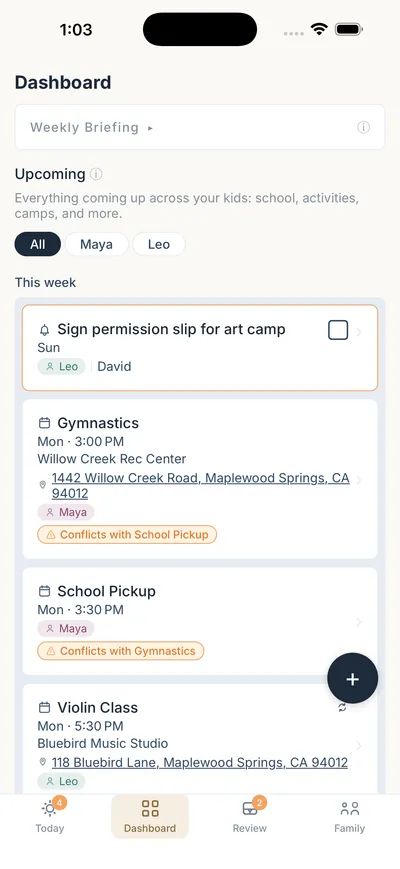
Kiddash Dashboard showing this week for Maya and Leo, with two conflicts flagged
School email
Camp flyer
Group text
Game schedule
Permission slip
Pickup change

Get a clear view of what's happening today, this week, and beyond.

See it by kid, shared across your whole family, including parents, grandparents, and caregivers.

TodayMon
School pickup
3:30 PMMaya· Sarah driving
Violin class
5:30 PMLeo· Grandma Carol driving
This weekTue to Sun
TueTennis lessonsMaya
ThuSwim classLeo
SunSign permission slipLeo
And beyondLater
Oct 24Picture dayMaya
Oct 31Fall festivalBoth
Nov 10Parent-teacher conferenceLeo
Shared with Sarah, David, Grandma Carol and Nina
How it works

Three steps. No typing.

  1. 1

    Forward it or snap it

    Send any school, coach or camp email to Kiddash. Or take a photo of the flyer.

  2. 2

    Check it once

    We pull out the dates, times and places. You tap confirm or edit before anything is added.

  3. 3

    Everyone's in sync

    Your family and caregivers see the same plan, by kid, on one shared dashboard.

One photo.
Every detail.

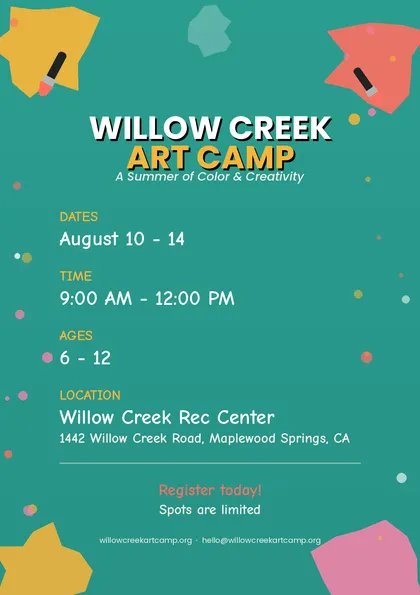
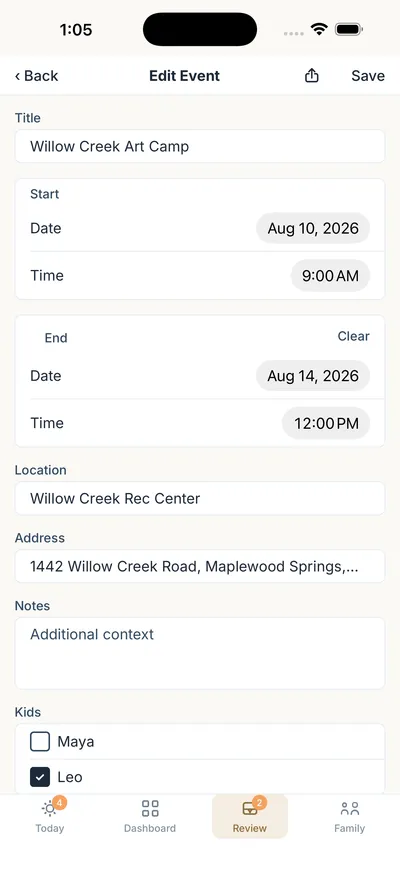
Snap a camp or school flyer and Kiddash fills in the dates, times and address, ready to confirm. Pasted texts and documents work too.

Willow Creek Art Camp flyer listing dates, time, ages and location
Kiddash Edit Event screen filled in with Willow Creek Art Camp details
Gymnastics
Mon · 3:00 PM
Maya
Conflicts with Violin Class
Violin Class
Mon · 3:30 PM
Leo
Conflicts with Gymnastics
Assign a driver
Violin Class
Mon · 3:30 PM
Leo
Grandma Carol is driving

Two places at 3:30?
Kiddash noticed first.

When plans overlap, Kiddash flags them, so you plan ahead. Assign a driver and everyone sees who's driving, from your partner to Grandma.

One plan for the whole family.

Invite parents, co-parents, grandparents and sitters. Everyone sees the same schedule on one shared dashboard.

S
Sarah
Parent
D
David
Parent
G
Grandma Carol
Grandparent
N
Nina
Caregiver

Your week, in one briefing.

A short summary of what's coming and what needs a decision. Read it over coffee on Sunday.

Weekly briefing

A busy week ahead. Maya has gymnastics Monday at 3:00, the same time as school pickup. Leo has violin at 5:30. Art camp needs a signed permission slip by Sunday.

1 conflict7 events

Already use Apple Calendar, Google Calendar or Outlook? Automatically see Kiddash events on your calendar, and never double book! 

Our story

We built the app we needed ourselves.

As busy parents with two kids, we were always one step behind. Soccer reminders buried in email. School newsletters we never opened. Picture day, missed again.

Kiddash turns those emails and flyers into one schedule the whole family shares, so you can stop managing information and start being present.

Illustration of two parents and two kids holding hands under a calendar

Less to carry.
More to enjoy.

One place for all your kids' happenings. Free. No trial, no credit card.

Download on the App StoreQR code linking to Kiddash on the App Store
Kiddash
Also in your browser, for planning at your desk